I Switched to the Xps 14 2024 and Here is What Happened
For over a decade, the premium laptop market was defined by a binary choice: the unwavering consistency of the MacBook Pro or the industrial reliability of the Dell XPS 13 and 15. However, 2024 marked a radical shift in Dell’s design philosophy. By sunsetting the venerable XPS 15 and introducing the XPS 14, Dell signaled an move toward a more futuristic, unified aesthetic across its lineup. Transitioning to this machine is not merely a hardware upgrade; it is an adoption of a new vision for the portable workstation. This article explores the nuanced experience of living with the XPS 14 2024, analyzing how its bold design choices mesh with the practical demands of modern productivity.
The Radical Shift in Form Factor
The first thing any user notices when switching to the XPS 14 is the physical presence of the device. Positioned as a middle ground between the portability of a 13-inch machine and the screen real estate of a 16-inch powerhouse, the XPS 14 attempts to solve the eternal "Goldilocks" problem of mobile computing. It weighs in at approximately 3.7 to 3.8 pounds, depending on whether the OLED panel is selected. While this is heavier than many ultra-portables, the density communicates a sense of structural integrity. The chassis is CNC-machined aluminum with a glass interior palm rest that feels cold to the touch and remarkably premium.
What defines the 2024 model, however, is the implementation of the "Plus" design language across the entire range. The XPS 14 features a seamless glass haptic touchpad, a capacitive touch function row, and a "lattice-less" keyboard. For the long-time XPS user, this is a jarring departure. The familiar carbon fiber weave of previous generations is gone, replaced by a minimalist, monochromatic look in either Graphite or Platinum. This transition represents a shift from "utility-first" design to "aesthetic-integrated" engineering.
Detailed Product Analysis: Performance and Thermal Management
Under the hood, the transition to the XPS 14 brings the Intel Core Ultra processors, specifically the Series 1 chips with integrated AI Boost (NPU) capabilities. In real-world testing, the performance jump is less about raw peak speed and more about efficiency and sustained workloads. For professionals moving from an older XPS 15, the XPS 14 offers a curious trade-back: you are moving to a slightly smaller screen, but the introduction of the NVIDIA GeForce RTX 4050 Laptop GPU in such a compact chassis provides a significant uplift for creative tasks.
Thermal management is where the XPS 14 proves its worth. Dell has utilized a sophisticated dual-fan system and a vapor chamber-style approach to keep the Intel Core Ultra 7 155H from throttling too early. During heavy video rendering sessions in Adobe Premiere Pro or complex compiling tasks in VS Code, the fans do spin up, but the pitch is lower and less intrusive than the high-pitched whine found in smaller 13-inch units. The performance-per-watt is impressive, particularly when the machine handles "bursty" tasks like photo editing or heavy web browsing with dozens of active tabs.
The Disappearing Touchpad and Keyboard Experience
The most controversial aspect of switching to the 2024 model is the input deck. The touchpad is completely invisible, integrated into the glass palm rest without any physical borders. Success with this machine depends on muscle memory. Because the haptic motor provides feedback regardless of where you "click" in the designated zone, the experience eventually becomes second nature. However, for the first few days, users will likely find themselves overshooting the active area.
The keyboard features larger keycaps with zero spacing between them. This design allows for a larger surface area per key, which theoretically reduces typing fatigue. In practice, the minimal travel (around 1.0mm) requires a light touch. It is a fast keyboard, but one that demands precision. Above the keyboard sits the capacitive touch row, which toggles between media keys and function keys. While visually striking, the lack of tactile feedback means users must look down to ensure they are hitting the volume or brightness controls, a regression in terms of pure ergonomics for "touch typists."
Looking for the best Electronics deals on Amazon?
Browse Now →Pros and Cons of the XPS 14 2024
- Pro: Stunning Display Options — The 14.5-inch 3.2K OLED touch display is the centerpiece of this machine. With its 120Hz refresh rate and 100% DCI-P3 color gamut, it is an industry leader for color accuracy and fluid motion.
- Pro: Superior Audio Quality — Dell has managed to fit a quad-speaker system (two upward-firing, two downward-firing) that rivals the market leaders. The spatial audio and bass response are remarkably deep for a 14-inch chassis.
- Pro: Build Integrity — There is zero deck flex. The hinge can be opened with one finger, and the overall rigidity of the aluminum body makes it feel like it could last a decade of travel.
- Pro: Battery Life for Productivity — Thanks to the Intel Core Ultra architecture, the machine can comfortably handle 8 to 10 hours of standard office productivity, though the OLED panel does draw more power during media consumption.
- Con: Limited Port Selection — Dell has fully embraced the USB-C future. With only three Thunderbolt 4 ports, a microSD card slot, and a headphone jack, most users will be forced to carry a dongle for USB-A or HDMI connections.
- Con: The Capacitive Touch Row — The replacement of physical Esc and Function keys with touch-sensitive icons remains a point of frustration for power users and developers who rely on tactile shortcuts.
- Con: Visible Fingerprints — The Graphite model, while beautiful, is a magnet for skin oils, requiring frequent cleaning to maintain its sleek appearance.
Comparative Market Positioning
To understand the XPS 14, one must look at how it compares to its primary rivals and its predecessor. The following table highlights the hardware specifications and design choices that define its place in the market.
| Feature | XPS 14 2024 | XPS 15 (Previous Gen) | MacBook Pro 14 (M3) |
|---|---|---|---|
| Display Size | 14.5-inch | 15.6-inch | 14.2-inch |
| Refresh Rate | Up to 120Hz (Variable) | 60Hz | Up to 120Hz (ProMotion) |
| Keyboard Style | Lattice-less / Capacitive Row | Traditional Island-style | Magic Keyboard (Physical) |
| Graphics | RTX 4050 (Optional) | RTX 4050/4060/4070 | Integrated M3/M3 Pro/Max |
| Weight | 3.7 lbs | 4.2 lbs | 3.5 lbs |
| Biometrics | Windows Hello IR & Fingerprint | Windows Hello IR & Fingerprint | Touch ID |
Buying Guide: Is the XPS 14 Right for You?
Before committing to the XPS 14, a buyer must evaluate their specific workflow. This is not a "one size fits all" laptop; it is a specialized tool for a specific type of user. If you are a professional who values aesthetics as much as performance, the following categories will help determine if the switch is worth it.
The Creative Professional
For photographers and video editors, the 14.5-inch screen is a significant upgrade over a 13-inch model without the bulk of a 16-inch machine. The 3:2 or 16:10 aspect ratio (depending on the specific panel configuration) provides more vertical space for timelines and toolbars. The inclusion of the RTX 4050 is sufficient for 4K video editing and heavy RAW photo processing, though 3D animators might still find the thermal limits of a 14-inch chassis restrictive compared to the larger "Pro" laptops.
The Business Executive
In a boardroom setting, the XPS 14 is a statement piece. It looks significantly more modern than almost any other laptop on the market. The improved webcam (now 1080p) and the AI-driven background noise cancellation make it an excellent machine for frequent video conferencing. However, the lack of an HDMI port means you must remember yourアダプター for older conference room projectors.
The Student and General User
While the XPS 14 is a luxury purchase, students in engineering or design programs will appreciate the balance of power and portability. The heavy-duty build means it can survive being shoved into a backpack daily. However, the price point often places it out of reach for general academic use unless specialized software requires a dedicated GPU.
Real-World Use Cases: What to Expect After One Month
Living with the XPS 14 reveals small details that a spec sheet cannot convey. For example, the Windows Hello facial recognition is incredibly fast on this model, often logging the user in before the lid is fully open. The haptic feedback of the touchpad is adjustable in the Windows settings, allowing for a "click" feel that is remarkably convincing, despite there being no moving parts.
One area where users must adapt is the power brick. Because the XPS 14 can draw significant power when the NVIDIA GPU is active, it comes with a 60W or 100W USB-C charger. This is larger than the chargers for the XPS 13, adding a bit of girth to your daily carry. On the positive side, the XPS 14 supports ExpressCharge, which can take the battery from 0% to 80% in about an hour, a lifesaver for those working in airports or cafes.
Looking for the best Electronics deals on Amazon?
See Deals →Software-wise, the "MyDell" application has been streamlined. It provides a centralized hub for managing thermal profiles (Quiet, Cool, Optimized, and Ultra Performance). Most users will find "Optimized" to be the best balance, as "Ultra Performance" significantly increases fan noise for a relatively modest 10-15% gain in sustained rendering speeds.
Refining the Experience: Configuration Advice
When switching to the XPS 14, the configuration choice is critical. Buyers are often tempted to stick with the base FHD+ non-touch screen to save money and battery life. However, this negates one of the primary reasons to own an XPS: the InfinityEdge display experience. The OLED 3.2K touch panel is highly recommended for anyone doing creative work, as the infinite contrast ratios and deep blacks make for an exponentially better viewing experience.
Memory is another sticking point. On the 2024 models, the RAM is soldered to the motherboard to achieve the thin profile and high-speed LPDDR5x performance. This means you cannot upgrade the memory later. For a machine intended to last four to five years, opting for 32GB of RAM is a wise investment, particularly since Windows 11 and modern web browsers are increasingly memory-intensive.
Conclusion
The switch to the Dell XPS 14 2024 is a transition into a new era of Windows hardware. It is a machine that prioritizes a cohesive, futuristic vision over traditional ergonomic standards. By merging the "Plus" design with a more capable 14-inch frame, Dell has created a laptop that feels like a piece of high-end furniture that happens to be a powerful computational tool.
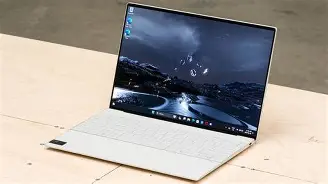
While the invisible touchpad and capacitive function row present a learning curve that may frustrate some long-time PC users, the core of the laptop remains exceptional. The build quality is unparalleled in the Windows ecosystem, the OLED display is a masterclass in visual engineering, and the performance is finely tuned for the modern "prosumer." If you are willing to trade a few physical keys and legacy ports for a glimpse into the future of laptop design, the XPS 14 stands as one of the most compelling and daring releases in the electronics category this year. It is a machine that demands adaptation, but for the right user, the rewards of its portability and power are well worth the adjustment period.